
How to Use Google Calendar for Meal Planning (Step-by-Step)
People often try to use Google Calendar for meal planning because it’s already part of their daily routine. If your schedule is there, your meals should be too. The problem is that building a meal plan manually inside a calendar can get tedious fast. Here’s how to do it, and a much faster way to make it work week after week.
Why use Google Calendar for meal planning?
Google Calendar can be a practical meal planning tool because it puts your meals where your schedule already lives. Instead of keeping recipes, notes, and plans scattered across different apps or scraps of paper, you can see what’s for dinner right alongside the rest of your week.
- Keeps meals tied to your real schedule
- Reduces daily “what’s for dinner?” decision fatigue
- Easy to check on phone and desktop
- Can be shared with family members
- Makes weekly planning more visual
Method 1: Manual meal planning in Google Calendar
If you want to use Google Calendar as a meal planner without any extra tools, you can absolutely do it. The basic idea is simple: create a dedicated calendar for meals, then add each dinner or lunch as its own event.
Step 1 — Create a dedicated “Meals” calendar
Start by creating a separate calendar just for your meal plan. Keeping meals separate from work, appointments, and reminders makes everything easier to scan and update.
- Open Google Calendar
- Create a new calendar called Meals or Meal Plan
- Choose a color that stands out from the rest of your schedule
Step 2 — Add meals as events
Add a calendar event for each planned meal. You can keep it simple with a dish name, or add more detail if you want.
- Example: Grilled Chicken and Vegetables
- Set the time, such as 6:00 PM
- Use all-day events if you prefer a broader planning view
Step 3 — Repeat or duplicate events
If you repeat favorite meals, you can use recurring events or duplicate a previous meal and edit it. This helps, but it still becomes repetitive when your weekly plan changes often.
Step 4 — Add notes, recipe links, or prep reminders
Use the event description field to paste recipe links, add a quick prep note, or remind yourself to thaw something the night before. This can make the calendar much more useful, especially on busy weekdays.
Example: Add the recipe link, prep notes, or a short grocery reminder directly inside the calendar event.
The problem with manual meal planning in Google Calendar
The manual method works, but it tends to break down over time. It’s one more weekly task, and every adjustment means editing events one by one.
- It takes time to create every meal event manually
- It’s annoying to adjust from week to week
- It doesn’t connect naturally to your recipe browsing or planning flow
- It becomes repetitive fast if you plan regularly
That’s why a lot of people start with Google Calendar, but then look for a faster way to fill it.
A faster way to meal plan with Google Calendar
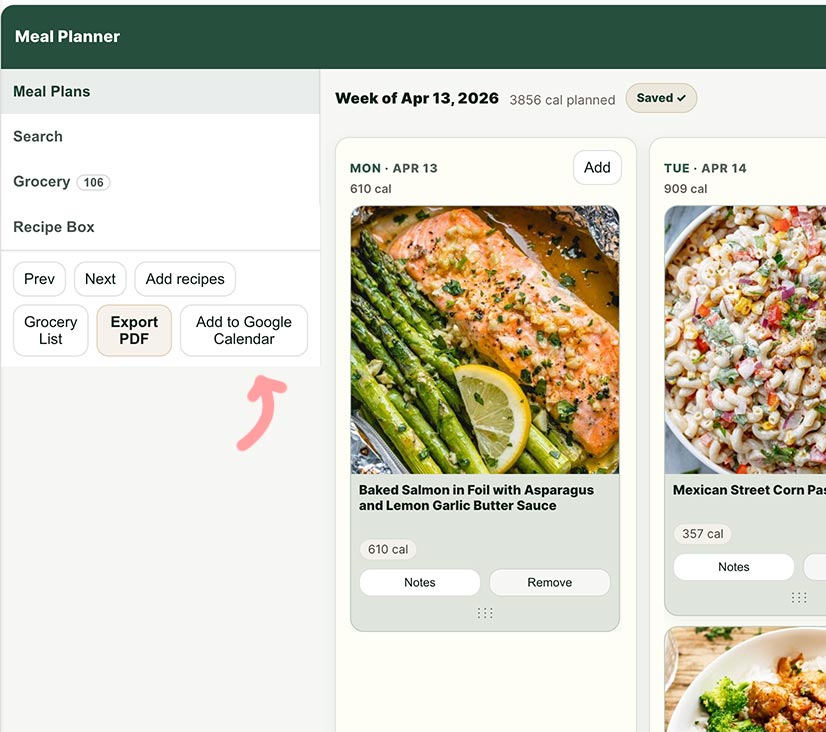
Instead of creating meal events one by one, you can build your weekly plan first and export it directly to your calendar. That keeps the convenience of Google Calendar without all the manual setup.
How it works
- Add recipes to your weekly meal plan
- Click Export to Calendar
- Your meals appear in Google Calendar automatically
This gives you the same visual calendar view, but removes most of the repetitive work.
Build your week once → Then send it to your calendar
Why this method is easier
The biggest advantage is that you plan meals in a meal planner, not in a calendar interface that was never really designed for recipe organization. Then you use the calendar for what it does best: showing your week visually.
- No manual event creation
- No copy-pasting recipe names over and over
- Easier to rearrange meals before exporting
- Works better with a real weekly meal planning workflow
- Can also work with iPhone and iCloud calendars
Tips for better meal planning
Whether you use Google Calendar manually or export your meals automatically, a few small planning habits can make the whole system easier to maintain.
- Plan 4 to 5 dinners instead of trying to plan every single meal
- Leave one night flexible for leftovers, takeout, or a quick pantry meal
- Match easy meals to your busiest days
- Keep a short list of fallback recipes you can make fast
- Repeat favorite meals instead of reinventing the week every time
Can you share your meal plan with family?
Yes. One of the useful things about meal planning in a calendar is that it becomes easy to share. Once your meals are in Google Calendar, they can be viewed across devices and shared the same way other calendars are shared.
- Share the calendar with family members
- Check the meal plan on your phone anytime
- Keep everyone aligned on the week ahead
Manual Google Calendar meal planning vs a dedicated meal planner
| Manual Google Calendar | Meal Planner + Calendar Export |
|---|---|
| Create every meal event by hand | Build your week once and export it |
| Copy-paste recipe names and notes | Use your planned meals directly |
| Harder to edit weekly | Easier to rearrange before exporting |
| Works, but becomes repetitive | Faster and easier to maintain |
Frequently asked questions
Can I use Google Calendar as a meal planner?
Yes. You can create a dedicated meal calendar and add meals as events. It works well for visibility, but can take time to maintain manually.
Is there a Google Calendar template for meal planning?
You can create a simple meal planning structure in Google Calendar, but many people prefer using a meal planner and exporting the final plan into their calendar.
What’s the easiest way to add meals to Google Calendar?
The easiest method is to create your weekly meal plan first, then export it as calendar events instead of adding each meal by hand. You can use our meal planner directly, or check more info about our meal planner for Google Calendar.
Does this also work on iPhone?
Yes. If your workflow supports calendar export, it can also work with iPhone and iCloud calendar setups.
Final thoughts
Google Calendar can absolutely help with meal planning, especially if you like seeing your meals inside your weekly schedule. But if you plan meals regularly, doing everything manually can become more effort than it’s worth.
A better approach is to build your plan first, then export it to your calendar in seconds. That way, you keep the clarity of a calendar without turning meal planning into another admin task.
Plan your meals visually → Then send them to Google Calendar
